
Small service businesses depend on information. Every customer appointment, service request, equipment repair, and invoice generates details that may be needed again.
Yet many businesses manage this information using a collection of spreadsheets, calendars, email messages, handwritten notes, and independent software applications.
Each tool may perform its individual task adequately. The difficulty arises when employees need information that exists in several different places.
For a growing service company, connecting business information can be just as important as collecting it.
The Hidden Cost of Disconnected Business Information
Consider a small company that provides residential equipment maintenance and repair services.
The office maintains customer contact information in a spreadsheet. Appointments are entered into an online calendar. Technicians record their work on paper forms, and invoices are created using a separate billing application.
This arrangement may work when the company has only a handful of customers.
However, as service requests increase, employees spend more time moving between systems and searching for information.
A returning customer might call to schedule another repair. Before the appointment can be arranged, someone must locate the customer’s previous service history, identify the equipment involved, and determine whether additional work was recommended.
What should be a straightforward process becomes a series of administrative tasks.
The problem isn’t necessarily a lack of software. It’s a lack of connection between the information the business already maintains.
Why More Software Isn’t Always the Answer
When a business encounters an administrative problem, the natural response is often to look for another application.
A scheduling problem leads to scheduling software. Customer records lead to a contact management application. Invoicing requires another tool.
Individually, these applications may provide useful capabilities. Together, however, they can introduce additional complexity.
Employees may need to learn several interfaces, maintain multiple accounts, and enter the same customer information repeatedly.
Information can also become inconsistent when changes made in one application aren’t reflected in another.
Adding software doesn’t necessarily simplify operations. Sometimes the better solution is to reduce the number of disconnected processes.
Think in Terms of Business Relationships
One of the most useful principles in software design is recognizing how information relates to other information.
For a service company, the customer is often the starting point.
That customer may have one or more service locations. Each location may contain equipment requiring maintenance. Service appointments generate job records, which may eventually result in invoices and payments.
These aren’t independent pieces of information. They’re parts of an ongoing business relationship.
A practical service management system should make those relationships easier to understand and maintain.
Customers and Service Locations
A property manager might own or manage several buildings, each requiring different types of maintenance.
Maintaining separate customer and service-location information helps employees identify where work must be performed without confusing the service address with the billing address.
Equipment and Service History
Equipment records become more useful when they can be associated with the locations where the equipment is installed and the work performed on it.
This relationship can help a business understand recurring service requirements and respond more effectively when customers request additional work.
Jobs and Employee Assignments
Scheduling a service appointment involves more than selecting a date.
The business must know what work is requested, where it will be performed, and which employee is responsible.
Keeping those details connected can reduce confusion between office personnel and field technicians.
Completed Work and Customer Billing
Service work often generates labor charges, material costs, and other billable expenses.
When billing information is disconnected from job records, preparing invoices can require additional research or duplicate data entry.
Connecting completed work with billing helps maintain a clearer record of the services provided.
How Better Information Management Improves Daily Operations
Organized business information provides benefits that extend beyond keeping accurate records.
Less Time Searching for Answers
Employees shouldn’t have to search through multiple files to answer routine questions about customers, appointments, or previous work.
When related information is organized consistently, everyday questions become easier to resolve.
Fewer Opportunities for Data Entry Errors
Entering customer information into several applications creates opportunities for inconsistent names, addresses, telephone numbers, and other details.
Reducing unnecessary duplication can improve record accuracy.
More Consistent Customer Service
Customers appreciate businesses that understand their service history and can respond to questions without requiring them to explain everything again.
Accessible service records can help employees provide a more consistent customer experience.
Better Visibility Into Business Activity
Business owners need to understand more than how many appointments are scheduled.
They also need visibility into completed work, outstanding invoices, expenses, and other operational activities.
When business information is organized, reviewing these activities becomes easier.
What Small Businesses Should Look for in Management Software
Choosing software shouldn’t begin with the longest possible feature list.
Instead, business owners should identify the administrative problems that consume the most time.
Before evaluating an application, consider these questions:
- Can employees locate customer information without searching multiple systems?
- Can service locations and equipment be associated with the appropriate customers?
- Can appointments and job assignments be organized consistently?
- Can employees review previous service activity?
- Can completed work be connected to customer billing?
- Can business owners review operational and financial information without manually combining several reports?
- Is the application straightforward enough for employees to use regularly?
The objective isn’t to acquire the most sophisticated software available. It’s to find a practical solution that addresses the business’s actual needs.
Practical Software Design Starts With Real Problems
At Rock Local Media Group, Inc., our approach to software development begins with a straightforward principle:
Find the pain. Validate the need. Design the simplest possible solution.
This approach is particularly important for small businesses.
Large enterprise systems may provide extensive customization, complex workflows, and capabilities designed for organizations with hundreds of employees.
But a small service company may simply need a reliable way to manage customers, schedule work, maintain service histories, and handle billing.
Providing those essential capabilities without unnecessary complexity can deliver meaningful value.
Good software should support the way people work rather than require businesses to reorganize their operations around the software.
ServiceRep: Connecting the Everyday Activities of a Service Business
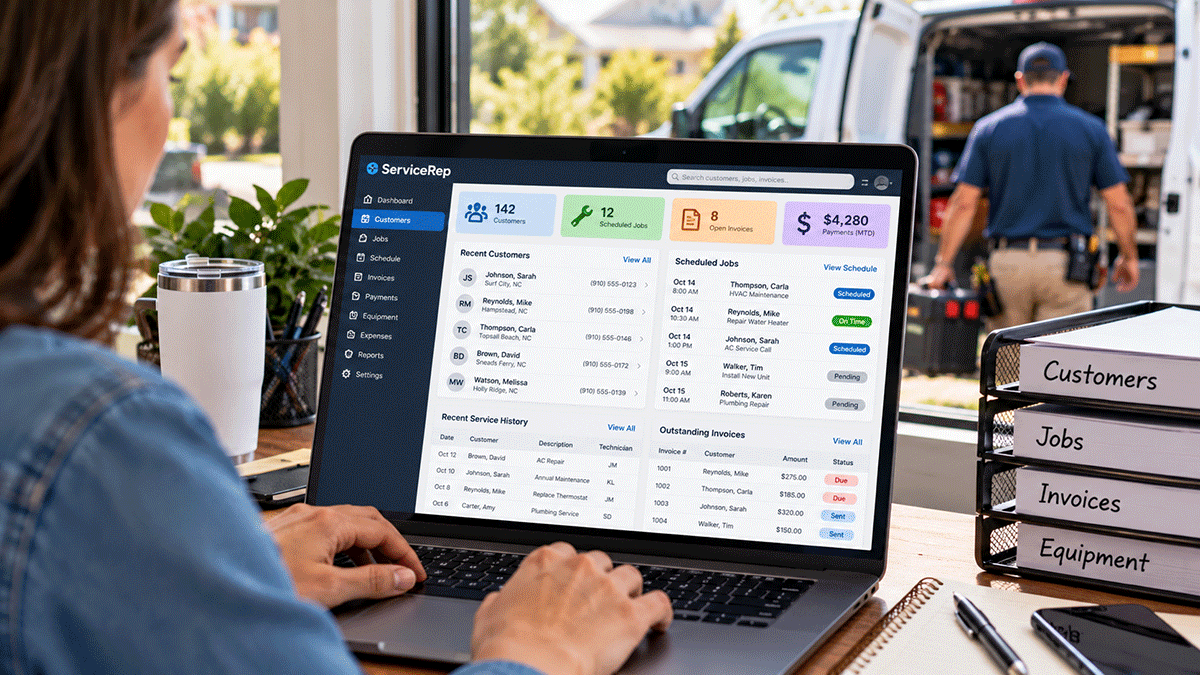
One example of this philosophy is ServiceRep by Local Service Rep, a software application developed for small service businesses.
ServiceRep is designed to bring several related business activities together, including:
- Customer information and service locations.
- Equipment records and service history.
- Service jobs and appointment scheduling.
- Employee and technician assignments.
- Customer invoicing and payment records.
- Business expenses and reporting.
By organizing these activities within a connected application, ServiceRep provides an alternative to maintaining multiple disconnected spreadsheets and administrative systems.
The emphasis is on practical functionality for small service companies rather than unnecessary enterprise-level complexity.
Learn more about ServiceRep and its customer and service management capabilities.
The Real Goal Is Simpler Business Operations
Small business owners don’t start their companies because they want to spend their evenings organizing spreadsheets or searching for missing customer information.
They want to provide valuable services, build customer relationships, and operate profitable businesses.
Technology should help them accomplish those goals.
When customer information, service activity, and billing records are organized around the actual relationships within a business, everyday operations can become more efficient.
That doesn’t require the most expensive software or the largest collection of features.
It requires understanding the problem and choosing a solution that makes the work easier.
At Rock Local Media Group, that’s the philosophy behind the practical software solutions we develop.
Explore Our Software Solutions
Rock Local Media Group, Inc. develops practical, affordable software designed to solve everyday problems without unnecessary complexity.
- Software Solutions – Explore our software products for businesses and individuals.
- Custom Application Development – Learn about our approach to building software for specific business needs.
- Local Service Rep – Discover our family of small business software applications.
- DecaVault – Explore practical tools for personal information management and recordkeeping.
For additional insights, read Why Simple Software Builds Stronger Businesses.